Make it yours
Make Remilo comfortable to read
Choose your theme, accent, typography and Dock or Ball navigation.
Android · Updated 23 October 2026
On this page
Open Settings → Appearance. These choices change presentation; they do not erase cards or reset learning progress.
Theme, Color and Style
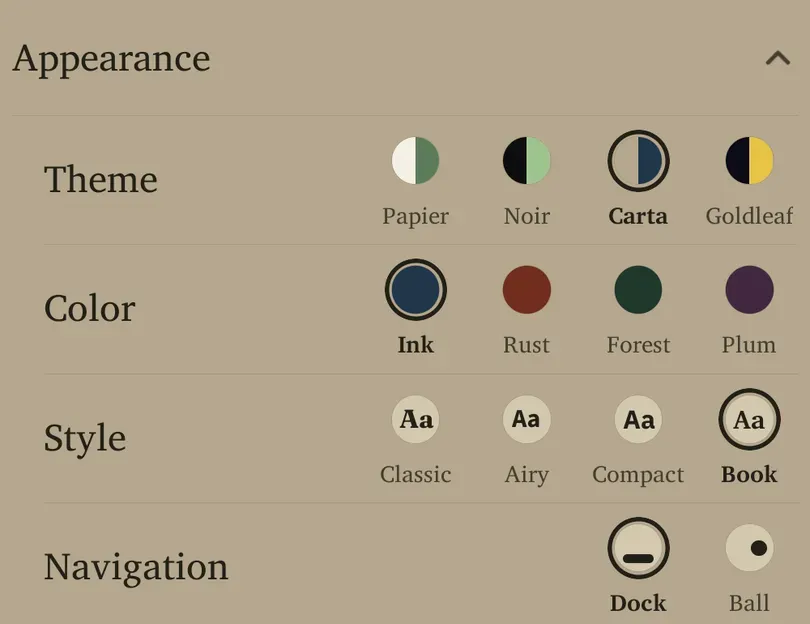
- Expand Appearance.
- Choose Theme: Papier Light, Papier Noir, Carta or Goldleaf. The previews show each palette; light and dark themes are distinct choices.
- Choose Color from the accents available for that theme. Accent options can differ between palettes.
- Choose Style: Classic, Airy, Compact or Book. These change typography and visual treatment; read the sample letters as well as the option name.
The selection ring and name identify the current choice. Accent selections are retained per theme, so switching themes can bring back that theme’s previous colour.
Start with a theme that is comfortable in your usual lighting. A dark theme is a preference, not a requirement for studying at night. You can also change card text size separately under Card options.
Dock or Ball
Navigation → Dock uses the bottom navigation bar. Ball uses a draggable floating control that opens the same destinations.
- Select the navigation style you want.
- With Ball, open it to reach Flow, Library, Progress, Settings and Add. Drag it to a comfortable edge position without covering the content you need.
- Return to Settings → Appearance → Navigation → Dock if you prefer the bar.
Dock is the fresh default. Tablets can use a navigation rail instead, so the phone screenshots may not match the position of every navigation control on a larger screen.
Readability and motion
For larger card text, use Card options → Card font size. That setting scales card content rather than every label in the app. Android’s system text settings can also affect readability.
If movement is distracting, check Flip animation, Card entry animation and Swipe style under Card options, along with Android’s accessibility preferences. Change one control at a time so you can tell which effect helps.